7. Deployment View
Ar42 specifications helper
Content
The deployment view describes:
-
the technical infrastructure used to execute your system, with infrastructure elements like geographical locations, environments, computers, processors, channels and net topologies as well as other infrastructure elements and
-
the mapping of (software) building blocks to that infrastructure elements.
Often systems are executed in different environments, e.g. development environment, test environment, production environment. In such cases you should document all relevant environments.
Especially document the deployment view when your software is executed as distributed system with more then one computer, processor, server or container or when you design and construct your own hardware processors and chips.
From a software perspective it is sufficient to capture those elements of the infrastructure that are needed to show the deployment of your building blocks. Hardware architects can go beyond that and describe the infrastructure to any level of detail they need to capture.
Motivation
Software does not run without hardware. This underlying infrastructure can and will influence your system and/or some cross-cutting concepts. Therefore, you need to know the infrastructure.
Maybe the highest level deployment diagram is already contained in section 3.2. as technical context with your own infrastructure as ONE black box. In this section you will zoom into this black box using additional deployment diagrams:
-
UML offers deployment diagrams to express that view. Use it, probably with nested diagrams, when your infrastructure is more complex.
-
When your (hardware) stakeholders prefer other kinds of diagrams rather than the deployment diagram, let them use any kind that is able to show nodes and channels of the infrastructure.
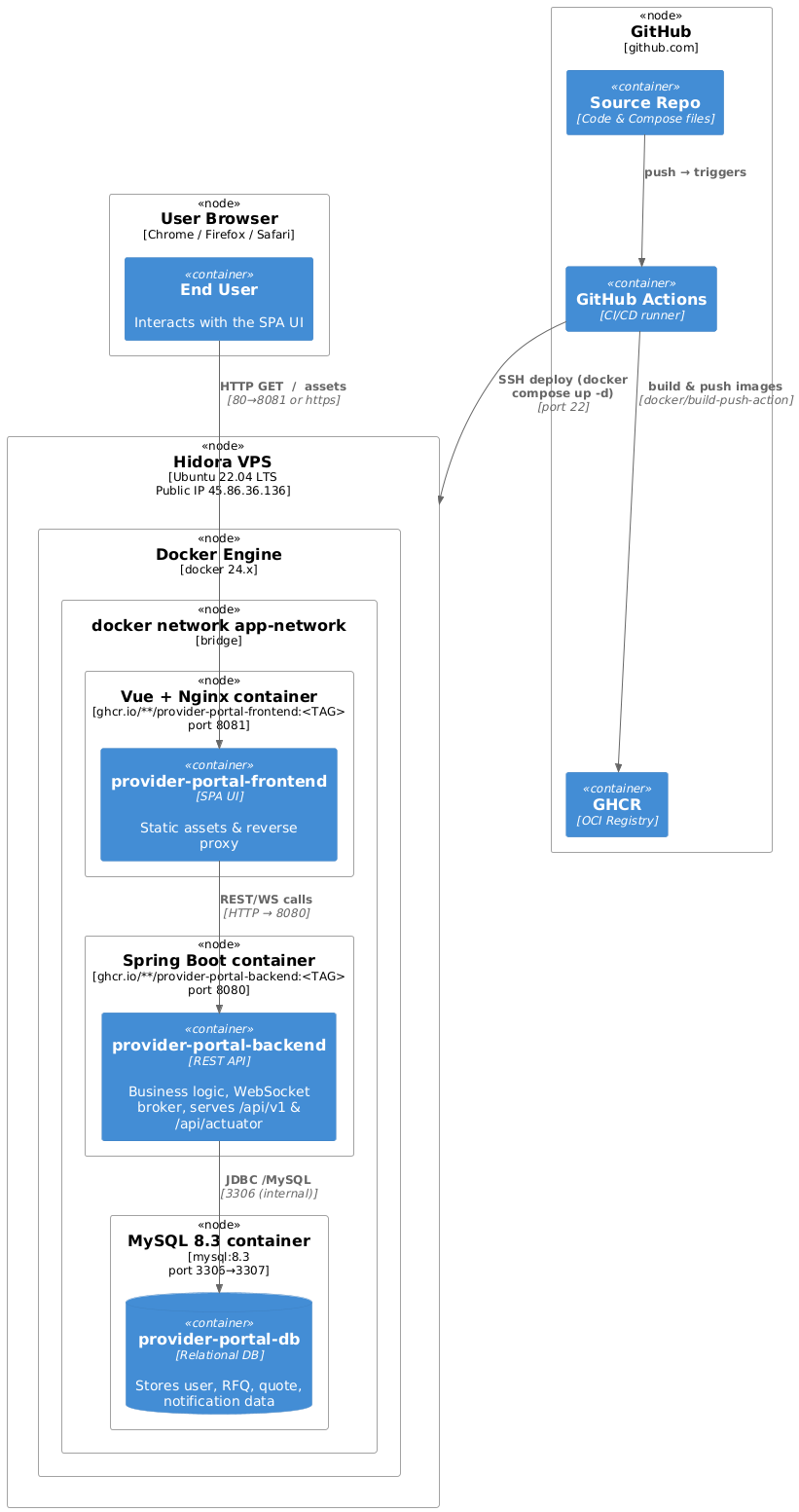
Overview (C4 Deployement)
Motifvations
The application is a classic 3-container stack (frontend + backend + database) that must be portable, cheap to host and quick to roll back. A single VPS with Docker Compose hits that sweet spot:
- Zero-downtime upgrades – new images are pulled and containers replaced atomically by docker compose up -d.
- Minimal DevOps footprint – the same compose file runs on every laptop, in CI and in production.
- Cost-efficient – one small VM (≈ Max 24 cloudlets 3GiB for 9.6 GHz) is enough for expected load.Will cost max EUR 105.70
Quality & Performance features
| Concern | Realisation |
|---|---|
| Availability | restart: unless-stopped on every service, MySQL health-check + service dependencies ensure orderly start-up. |
| Scalability | Horizontal scaling is not required yet; vertical scaling is one vps resize away. Services are stateless except MySQL, which is on a named volume. |
| Security | Only ports 8080/8081 (HTTP/HTTPS) and 22 (SSH) are exposed. Containers run with no-new-privileges:true; secrets are injected via CI. |
| Observability | Spring Boot actuator is enabled (/api/actuator/health) and used as container health-check; GitHub Actions surfaces build & deploy logs. |
| Rollback | Because tags are immutable (<SHA>), redeploying the previous tag instantly restores the earlier version. |
Mapping of building blocks to infrastructure
| Building block (runtime artefact) | Deployed to … | Notes / env vars |
|---|---|---|
| provider-portal-frontend | frontend container → 8081 | FRONTEND_URL for CORS; static assets served by Nginx |
| provider-portal-backend | backend container → 8080 | SPRING_PROFILES_ACTIVE=prod, DB & SMTP credentials, JWT_SECRET, WebSocket broker |
MySQL schema (provider-portal) | mysql-db container → 3306/3307 | Mounted volume mysql_data; remote root login blocked (MYSQL_ROOT_HOST=%). |
| Docker compose files | Repository root → VPS workspace | docker-compose.yml (+ docker-compose.prod.yml) pinned to <TAG> built in the same run |
| CI/CD Workflow | GitHub Actions (build, deploy) | Uses ssh-agent and docker/login-action; pushes to GHCR and redeploys via SSH |